















Short answer: an E106B can be considered for a non-critical laptop interview only after you map four separate paths: station power, audio data, monitoring and file saving. Check every adapter and device label, then rehearse the complete chain and play back the saved file. Product ratings alone do not establish low noise, USB-audio compatibility or recording runtime.
Start with what E106B documents
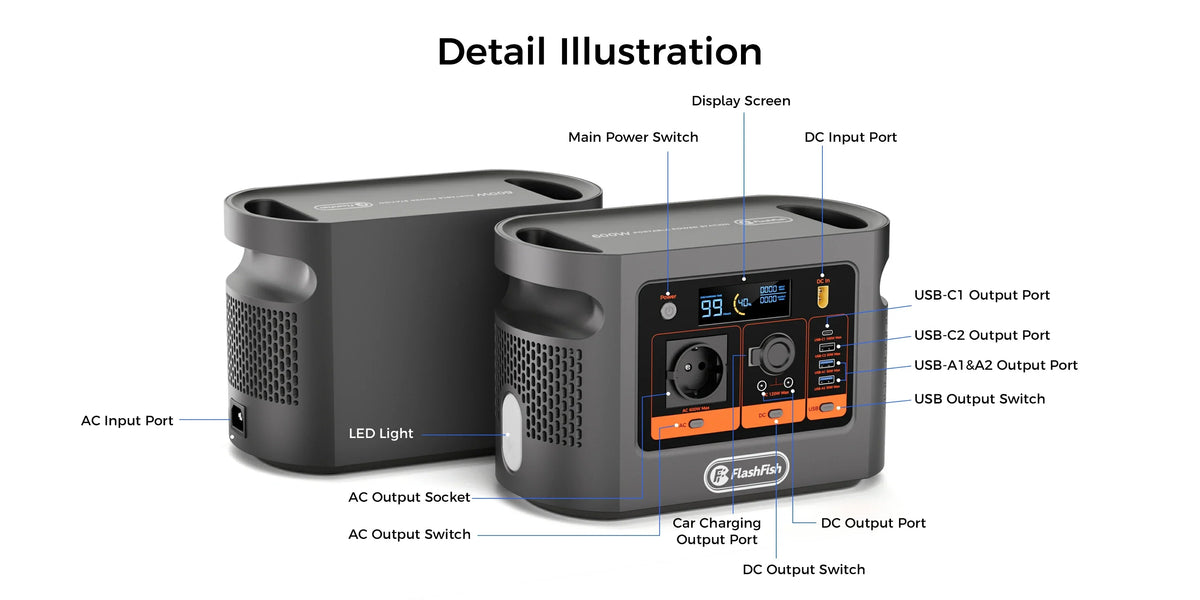
The exact-model record lists a 384Wh nominal battery, 600W continuous pure-sine AC output, one AC outlet and two USB-C power outputs rated up to 100W and 30W. The current E106B Europe page is the live product route. Peak AC output, usable delivered energy and a recording-chain runtime are not provided, so they cannot be used as shortcuts.
Draw the recording chain before connecting it
| Path | Record before the rehearsal | Acceptance check |
|---|---|---|
| Power station to laptop | Exact laptop and original charger input label | Correct regional supply, stable charging and no warning or abnormal heat |
| Power station to mixer or interface | Exact model, supplied adapter and input requirements | Device starts and remains stable through a full take |
| Audio data | Host port, interface port, cable and recording software | Every channel appears where expected and remains assigned after reconnecting |
| Monitoring | Headphones or powered monitor path | Speech, silence and clipping checks are audible before recording |
| File saving | Destination drive, filename rule and available space | Recorded file closes, reopens and plays from the saved location |
Review the current E106B outputs for your recording plan before deciding which power paths belong in the rehearsal.
Use exact device documentation, not category averages
The official Yamaha MG specifications separate model-specific USB-audio, power-requirement and consumption fields. That is the right level of detail: write down the exact mixer or interface model and use its own label and manual. A Yamaha example does not validate a different interface or the whole E106B chain.
The USB-IF overview explains that USB Power Delivery can place power alongside data on USB-C, but implementation still belongs to each device. The E106B record documents USB-C1 and USB-C2 as outputs; it does not establish USB data or USB-C charging input. Keep the laptop-interface data route separate from the station power diagram.
Run one complete rehearsal
- Use the real laptop, interface or mixer, microphones, headphones, cables, storage and recording software.
- Place the station and cables where they will be used. The HSE equipment guidance recommends checking that equipment suits both the work and the electrical supply and inspecting its condition.
- Record silence, normal speech and the loudest expected voice while monitoring.
- Save the file to the planned destination, close it, reopen it and play it back from the saved copy.
- Repeat any planned reconnect or break procedure. If channels, clocking, charging or file paths change unexpectedly, stop and correct the plan.
Listen for faults without inventing a noise claim
No source reviewed here establishes an E106B noise floor or ground-loop result. During the rehearsal, listen for hum, buzz, clicks, dropouts and fan or handling noise in both live monitoring and the saved file. Do not remove protective earth, improvise wiring or treat a quiet first minute as proof of a clean full session. Change one documented element at a time and use the approved fallback if the cause is not clear.
Set a stop rule before the interview
| Observation | Decision |
|---|---|
| Complete rehearsal and saved-file playback pass with stable equipment | Proceed only for the same bounded non-critical setup, with the fallback ready |
| Unknown device label, adapter or software route | Pause and verify the exact manual; do not substitute a similar model |
| Hum, buzz, dropout, warning, trip, damage or unusual heat | Stop and resolve the cause before reuse |
| Interview cannot tolerate interruption | Use a separately approved continuity and recording plan |
Common mistakes
- Adding only charger wattages and calling that a compatibility test.
- Assuming every USB-C connection supplies both data and power.
- Testing speech live but not reopening the saved file.
- Changing the cable layout after the rehearsal.
- Using one AC outlet through unverified distribution hardware.
- Promising runtime from nominal capacity without measured whole-chain energy use.
Frequently asked questions
Can the E106B run a laptop interview recording chain?
It may fit a bounded non-critical chain only after every path, adapter and label is checked and the whole chain completes a rehearsal. The product record alone does not establish USB-audio compatibility, noise performance or runtime.
Should I power the laptop and mixer from the same outlet?
Do not assume that arrangement. Map the exact adapters and total load, remember that E106B has one AC outlet, and follow the equipment manuals and permitted distribution setup.
Does the E106B USB-C port carry interview audio data?
The E106B record documents USB-C1 and USB-C2 as power outputs. It does not establish a USB data connection or USB-C charging input.
How do I check for recording noise?
Make a monitored rehearsal in the actual room, record silence and speech, play back the saved file and stop if unexplained hum, buzz, heat, warnings or instability appears.
What is the minimum fallback?
Keep approved mains or a separately checked recorder available, save locally during the session and define a stop rule before the interview.
Sources and next step
This checklist uses the authoritative E106B record, the current Europe product route, Yamaha model-specific documentation, USB-IF protocol context and HSE equipment guidance. It does not report an E106B recording test. For the current manual or a regional-label question, Ask FlashFish Europe about the exact E106B regional version, then validate the real recording chain with its own manufacturers' instructions.



Leave a comment
Este site está protegido pela Política de privacidade da hCaptcha e da hCaptcha e aplicam-se os Termos de serviço das mesmas.