
















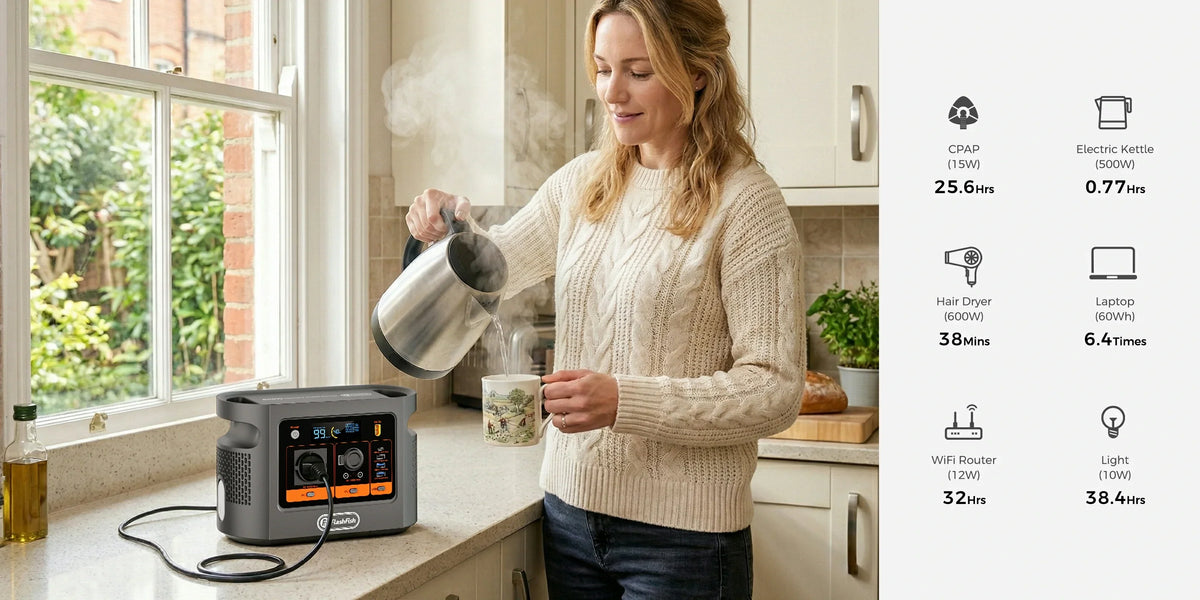
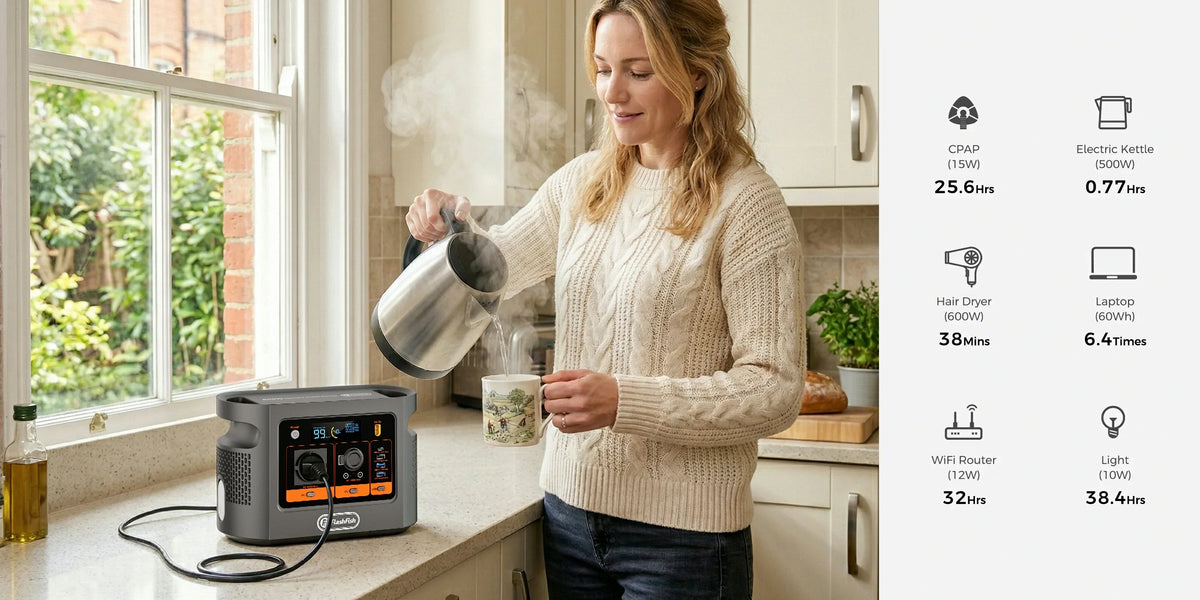
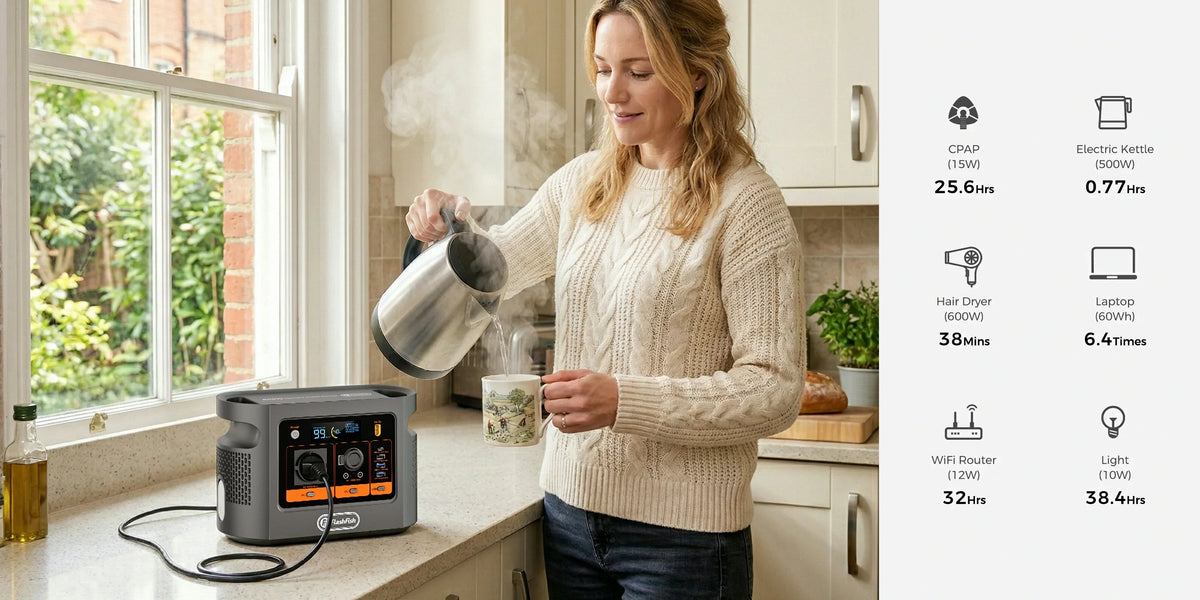
Short answer: the E106B is a plausible manual power source for many modest mini-PC-and-monitor setups because it provides 600W continuous pure-sine AC output and 384Wh nominal energy. That is only a screening result. Confirm the exact computer adapter, monitor label, regional plugs and combined load, then measure a representative work session. This article does not promise compatibility, seamless transfer or a fixed runtime.
A mini PC needs a different decision method from a tower desktop. The tower discussion often starts with a large internal power-supply label. A mini PC usually starts with a small external adapter whose rating changes by processor and configuration. The useful question is therefore not “is a mini PC small?” but “which adapter shipped with this exact unit, and what else is the monitor powering?”
In this guide: Two-label screen · Exact example · Session test · Fit and limits · FAQ
Start with two labels and one load map
Read the mini PC’s supplied AC adapter and the monitor’s rear label or manual. Record input voltage and frequency, adapter output rating, monitor maximum consumption and every device powered from the monitor’s USB hub. A keyboard receiver is small, but a phone or other USB device charging through the monitor still draws from the monitor’s AC input.
| Boundary | What to record | What it does not prove |
|---|---|---|
| Mini-PC adapter | Exact regional adapter and its rated watts | Normal wall demand or workload energy |
| Monitor | On-mode and maximum consumption, plus USB loads | A universal monitor value |
| Extension device | Regional rating, cable condition and connected items | Permission to daisy-chain or exceed its rating |
| Power station | Continuous output, outlet count and nominal Wh | Compatibility, UPS transfer or delivered Wh |
A concrete mini-PC and monitor screen
Lenovo’s current ThinkCentre M75q Gen 5 specification lists 65W, 90W and 135W autosensing adapter options, with the exact configuration determining the right adapter. Dell’s P2421 user guide lists 14.8W on-mode and 42W maximum consumption; Dell notes that the maximum includes maximum power loading on the monitor’s USB ports.
If a buyer conservatively screens the largest listed Lenovo adapter and Dell’s maximum, the label sum is 177W. That remains below the E106B’s 600W continuous AC rating, but it is not a compatibility test and not an expected live load. The computer may have a different adapter, the monitor maximum may include USB use, and the real session changes with processor load, display brightness and attached devices.
Plan around one AC outlet
The local E106B record lists one AC outlet. A mini PC and an AC monitor therefore normally require one suitably rated regional extension device or a different approved power path. Electrical Safety First advises users not to overload extension equipment and not to plug one extension into another. Keep the lead undamaged, dry, visible and arranged so it cannot become a trip or heat hazard.
If the monitor powers USB accessories, include them inside the monitor boundary. If a phone is charged from E106B USB-C instead, count it as a separate station load. The objective is a map in which every watt crosses one boundary once.
Run a representative session before relying on the setup
- Confirm the delivered E106B regional label and the exact adapters for the mini PC and monitor.
- List keyboard, storage, speakers, camera readers and all USB-powered accessories.
- Connect through one correctly rated extension device; do not daisy-chain.
- Start the workload you actually expect: video calls, browser tabs, local processing or file transfers.
- Measure combined watts and accumulated watt-hours at the station or an appropriate meter boundary.
- Test an orderly shutdown while charge remains; do not consume the planning reserve during rehearsal.
A short idle reading is weak evidence. A useful test includes the monitor brightness, peripherals and peak workload that matter to the user. It also records the software state needed for a clean shutdown. For work that cannot tolerate a brief interruption, a dedicated UPS remains a separate requirement.
When E106B fits—and when it does not
| E106B can be a reasonable candidate when | Choose another plan when |
|---|---|
| The exact combined AC screen remains comfortably below 600W. | The computer, monitor or attached equipment approaches the station or extension rating. |
| You can tolerate manual connection and a planned shutdown. | You need verified seamless UPS transfer or zero-interruption operation. |
| You will measure the complete setup rather than divide 384Wh by one label. | You need a fixed duration without testing the real workload. |
| The setup is non-critical and uses dry, inspected regional cables. | The equipment is safety-critical, professionally installed or used with damaged or improvised leads. |
For the decision-stage check, Compare E106B with both workspace adapter labels. Use the verified local fields as a screen, then let the exact delivered equipment and representative measurement decide.
FAQ
Can E106B run every mini PC and monitor?
No. Check the exact computer adapter, monitor label, combined AC load, regional plugs and cable arrangement. Product-family names do not establish compatibility.
Should I use the mini PC adapter rating as its normal wattage?
No. Use the supplied adapter rating as a conservative input screen, then measure the complete setup during representative work to understand actual demand.
Does a monitor USB port add another load?
Yes when it powers an accessory, but avoid counting it twice. A whole-monitor wall measurement already includes loads supplied through that monitor.
Will E106B keep the computer running without interruption?
This guide does not establish automatic transfer or UPS behaviour. Treat the station as manual backup unless the exact setup has been tested for its continuity requirement.
How long will a mini PC and monitor run?
No fixed duration is supported here. Measure accumulated watt-hours during a realistic session, allow for station overhead and keep an orderly-shutdown reserve.
Conclusion
The strongest mini-PC decision is a three-part record: the exact adapter variant, the monitor’s full boundary including USB loads, and measured session energy. If this setup grows beyond one compact workstation, Compare portable stations for your measured workspace rather than assuming the first label calculation scales.
Sources and editorial notes
Product fields come from the FlashFish E106B manual-derived local record and fresh Europe Shopify status. Device examples come from Lenovo’s M75q Gen 5 PSREF and Dell’s P2421 user guide. Extension guidance comes from Electrical Safety First. No hands-on test, owner experience, delivered-energy result, compatibility result or uninterrupted-transfer result is claimed. Human review must check exact delivered labels, source versions, cable routing, regional electrical wording and the rendered article before publication.



Lasă un comentariu
Acest site este protejat de hCaptcha și hCaptcha. Se aplică Politica de confidențialitate și Condițiile de furnizare a serviciului.