
















Short answer: finish every software-controlled step before deliberately changing E106B power. Copy the files, use the verification method documented for the actual software, close the job, eject each device correctly and keep the original camera card until the handover is accepted. E106B does not by itself establish data integrity or hot-swap continuity.
Map power and data as separate paths
| Item | Power path to record | Data path to record | Completion signal |
|---|---|---|---|
| Laptop | Original charger or supported USB-C profile | Internal storage and operating system | Copy job closed and system stable |
| Card reader | Bus-powered or its exact adapter | Reader port and cable | Card no longer active and safe-eject complete |
| External storage | Bus-powered or separate adapter | Drive port, cable and destination path | Write activity finished and safe-eject complete |
| Original camera card | None while in reader unless its instructions say otherwise | Source media | Retained and labelled until handover acceptance |
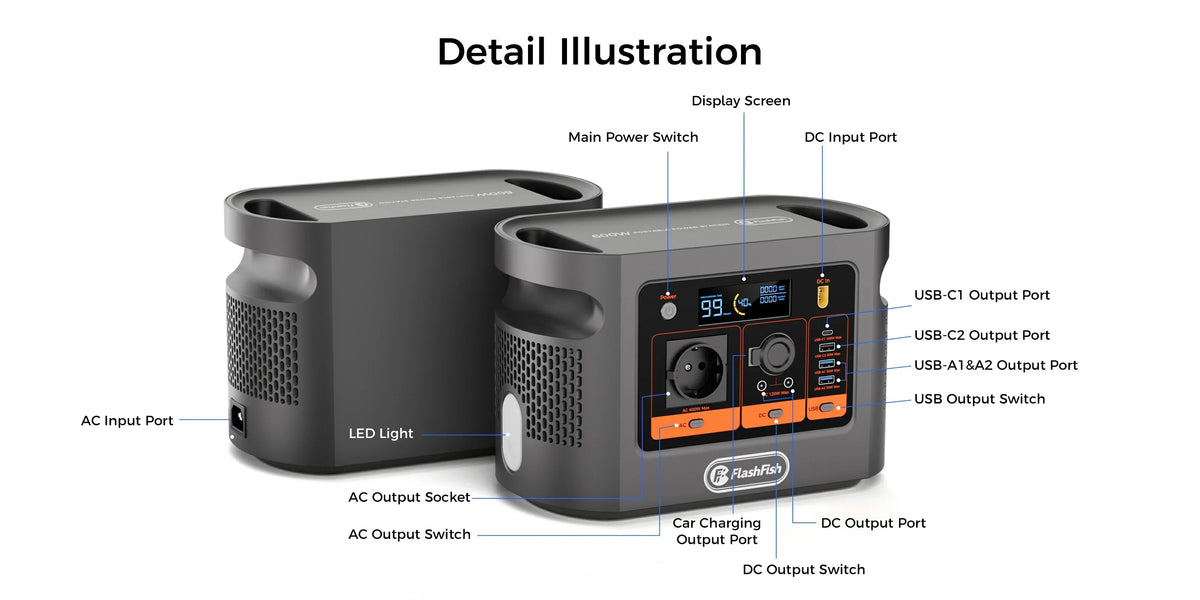
The exact E106B record lists a 384Wh nominal battery, 600W continuous pure-sine AC output, one AC outlet and USB-C outputs up to 100W and 30W. The current E106B Europe page is the live route. Those ratings do not prove that a laptop, reader or drive accepts a particular connection.
Review the current E106B power outputs before mapping the offload, then match every device to its own documentation.
Why USB-C still needs a role map
The USB-IF Power Delivery overview explains that USB-C can carry flexible power alongside data. That does not mean every USB-C port performs every role. The E106B record documents USB-C1 and USB-C2 as power outputs only. Record whether the laptop-reader or laptop-drive cable carries data, power or both, and verify the exact supported profiles instead of inferring them from the connector shape.
Use a controlled offload sequence
- Label the source card and make it read-only through the camera or workflow only if the manufacturer's instructions support that method.
- Connect the laptop, reader and destination storage exactly as rehearsed.
- Create the destination folder and record its full path before copying.
- Copy the files without deleting or formatting the original card.
- Use the verification method supported by the actual software. A file count alone may miss errors; do not invent a checksum workflow if the team has not validated one.
- Close the copy or catalogue job and confirm no write activity remains.
- Eject the destination storage and source media through the operating system or application instructions.
- Only then change the planned power source or hand the station to another user.
Define the handover record
| Record | What to write |
|---|---|
| Source | Card label, camera and owner |
| Destination copy | Device name and full folder path |
| Verification | Exact software method and result |
| Original-media retention | Who holds the card and when reuse may be approved |
| Power state | What remained connected, what was ejected and when E106B changed hands |
| Recipient | Name or role accepting the copies and retention plan |
Keep distribution hardware within its own rating
If the laptop and storage use AC adapters, remember that E106B has one AC outlet and any permitted distribution device becomes part of the setup. Electrical Safety First advises against overloading or daisy-chaining extension devices and says cable reels should be fully unwound for their rated use. Inspect the actual device and follow the local instructions; this general guidance does not approve a vehicle or field setup.
Stop conditions
- The destination path or verification method is unclear.
- The original card would need to be erased before the recipient accepts the copies.
- A device still shows write activity or will not eject cleanly.
- A cable, adapter or port role differs from the rehearsed map.
- The station, adapter or distribution device shows a warning, trip, damage or unusual heat.
- The task has become time-critical or cannot tolerate interruption.
Common mistakes
- Calling one copied folder a complete backup without defining independence or verification.
- Formatting the camera card immediately after a file count.
- Removing a drive before the operating system finishes buffered writes.
- Treating connector shape as proof of USB power and data roles.
- Changing power while the copy, catalogue or verification process is still open.
- Handing over the station without handing over the media status.
Frequently asked questions
Can E106B protect a camera transfer from interruption?
No automatic continuity or data-protection result is established. Finish the copy, verification and ejection steps before deliberately changing power.
When may I remove the camera card?
Only after the actual software's copy and verification method is complete. Retain the original card until the handover is accepted.
Does a second folder count as a backup?
A second folder on the same device is not an independent copy. Define the destination, verification method and retention rule before the offload.
Can I power a laptop from E106B USB-C during the transfer?
E106B has documented USB-C power outputs, but the exact laptop, cable and requested profile still need manufacturer-supported matching.
What ends the handover?
The recipient confirms the expected files and copy locations, original-media ownership is clear and all devices are safely ejected or shut down.
Sources and next step
This checklist uses the authoritative E106B record, the current Europe route, USB-IF protocol context and Electrical Safety First distribution guidance. It does not report a transfer or backup test. For current model instructions, Ask FlashFish Europe about the exact E106B manual and regional unit, then rehearse the real camera, reader, storage and software workflow with non-critical media.



Commenta
Questo sito è protetto da hCaptcha e applica le Norme sulla privacy e i Termini di servizio di hCaptcha.