
















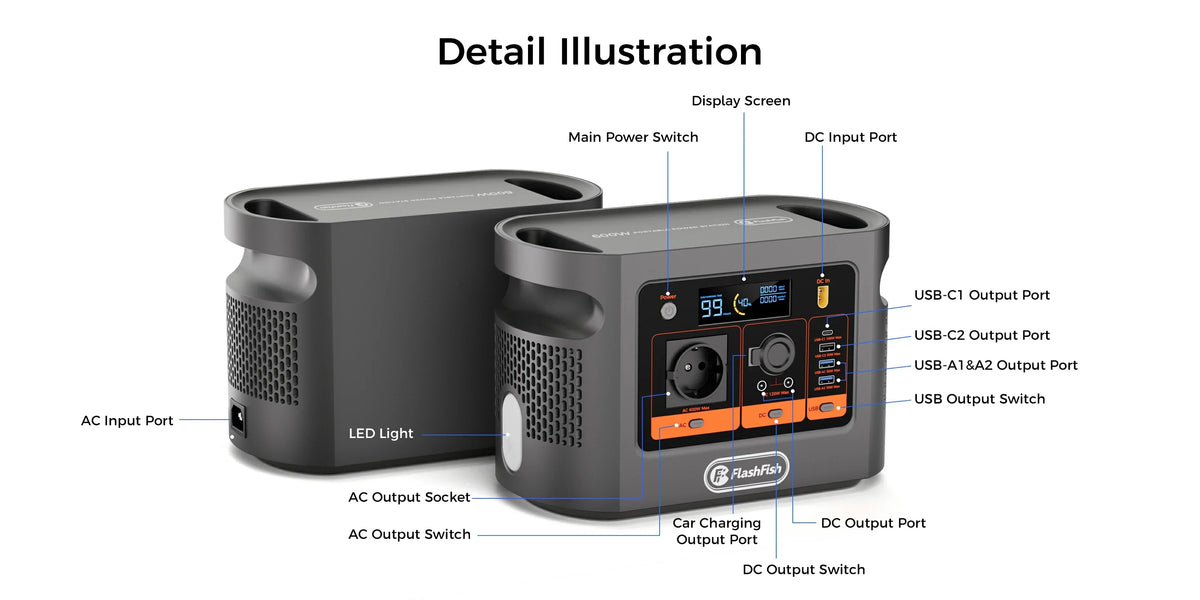
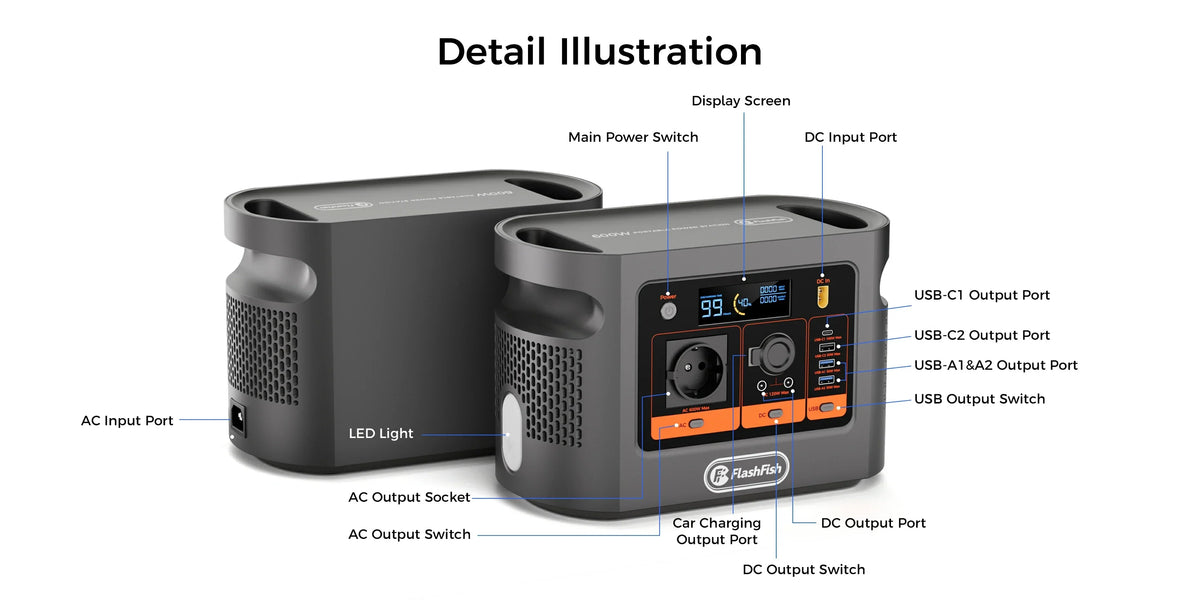
Short answer: A powered USB hub can be screened for use with a portable power station, but three budgets must be checked separately: the hub's input, the aggregate power available to downstream devices, and the upstream data link to the computer. A hub with nine connectors does not have nine independent maximum-power supplies, and the power station does not become a USB data host.
The practical rule is input budget, downstream budget, host path. If any one is missing from the manual, do not infer it from connector count or from the largest number printed beside one port.
The three-budget table
| Budget | What to record | Common error |
|---|---|---|
| Hub input | Exact adapter input or USB-C voltage/current profiles | Using the adapter output as constant wall draw, or assuming any USB-C source works. |
| Downstream allocation | Total shared capacity, per-port ceilings, grouped limits and hub self-use | Adding every port maximum even when the manual states a lower aggregate budget. |
| Host data | Upstream connector, computer port, operating system, cable and driver requirements | Plugging the hub into a power-only source and expecting data transfer. |
Port check: Check E106B port profiles and shared limits, then compare them with the hub's input—not with its number of downstream sockets.
One exact AC-powered hub example
The TP-Link UH720 shows why topology matters. Its current product page lists seven USB 3.0 data ports, two dedicated 5V/2.4A charging ports, one Micro-B upstream interface and an included 12V/3.3A adapter. The official datasheet illustrates the power adapter and upstream data cable as separate connections.
The adapter's 12V × 3.3A output equals a 39.6W nameplate ceiling on its DC side. It is not a promise of constant AC draw, and the source does not authorize adding seven data-port maxima plus two 12W charging ports. Use the exact aggregate rule for the delivered hardware version.
Three hub layouts
1. AC-powered USB-A hub plus laptop
The hub's original regional adapter uses E106B's single AC outlet, while its upstream data cable connects to the laptop. The laptop may use E106B USB-C1 or its own battery. Plan both power paths and the data cable; the AC adapter does not carry host data.
2. Bus-powered hub attached to the laptop
Here the laptop's USB host port supplies the hub and peripherals. The station may only be powering the laptop. Downstream capacity is therefore controlled by the laptop port and hub design, not by the station's headline USB-C maximum.
3. USB-C hub or dock with PD pass-through
Read the exact manual for charger input, host port, supported direction and power reserved by the dock. The USB-IF notes that Power Delivery can negotiate power direction and manage multiple peripherals, but products must implement those roles. Do not infer pass-through or reverse power from USB-C connectors.
How E106B changes the plan
E106B documents USB-C1 up to 100W, USB-C2 up to 30W, USB-A1 up to 30W and USB-A2 up to 30W. USB-C2 and USB-A1 share 5V/3A when used together. That shared condition matters for low-voltage hub/peripheral combinations, while USB-C1 is the stronger candidate for a compatible laptop power path. None of the station's USB outputs supplies computer-host data.
If the hub uses an AC adapter, E106B's one AC outlet becomes part of the layout. A multi-socket lead adds connection points but not station capacity. Avoid daisy chaining and include the lead, laptop adapter and hub adapter in the simultaneous-load and placement check.
Five-step test
- Record the hub model, hardware version and exact input.
- Copy the aggregate downstream rule, every grouped limit and any power reserved for the hub.
- Draw the upstream data path to the host separately from power.
- Connect the actual keyboard, drive, microscope, phone or other peripherals one at a time.
- Run the representative data and charging workload; record disconnects, slow-device warnings, heat and station/laptop battery direction.
When FlashFish E106B fits
- The hub has a documented input compatible with the chosen E106B output or regional AC adapter.
- The aggregate downstream budget covers the real peripheral set with margin.
- A laptop or other host supplies the required upstream data connection.
- The single AC outlet and shared USB group are planned before setup.
- The complete charging and data-transfer test is stable for the intended session.
When it does not fit
- The hub's aggregate budget or hardware version is unknown.
- The plan treats the power station as a USB host or assumes all USB-C hubs pass PD.
- Port maxima are added despite a lower adapter or shared-group ceiling.
- A storage drive, camera or other peripheral disconnects under representative load.
- The setup requires unverified reverse charging, proprietary drivers or improvised adapters.
Frequently asked questions
Can a powered USB hub run from a portable power station?
Often it can be screened, but only after checking the hub adapter or USB input, the station output, downstream shared limits and the separate upstream data connection. Matching connectors alone are insufficient.
Does the portable power station become the USB data host?
No. Its USB output supplies power. A hub that carries data still needs an upstream connection to a compatible computer, tablet or other host.
Can I add all downstream port labels to get the hub's total budget?
Not unless the manufacturer explicitly permits that aggregate. Port maxima, grouped limits and the adapter input can describe different ceilings. Use the hub's exact aggregate rule.
Will every USB-C hub pass power to a laptop?
No. Power Delivery pass-through, supported directions, host port, charger input and reserved hub power vary by model. Read the exact manual rather than inferring from USB-C connectors.
Which E106B output should feed a powered hub?
Follow the hub's documented input. An AC-adapter hub normally uses the regional AC adapter; a USB-C-powered hub requires a common profile with USB-C1 or USB-C2. Keep the host-data cable separate in the plan.
Next step: Use the Europe buying guide for the complete workstation load, including the laptop, hub, storage devices and every charger.
Sources and evidence limits
Checked 10 October 2026. E106B port facts come from the authoritative local manual-derived record and current Europe product page. USB-IF provides general Power Delivery context. TP-Link supplies one exact powered USB-A hub example and current datasheet. FlashFish publishes this guide. No hub, laptop, peripheral set, charging curve, data-transfer result or session duration was tested, and the ports image is identification context rather than compatibility evidence.



Zostaw komentarz
Ta strona jest chroniona przez hCaptcha i obowiązują na niej Polityka prywatności i Warunki korzystania z usługi serwisu hCaptcha.