
















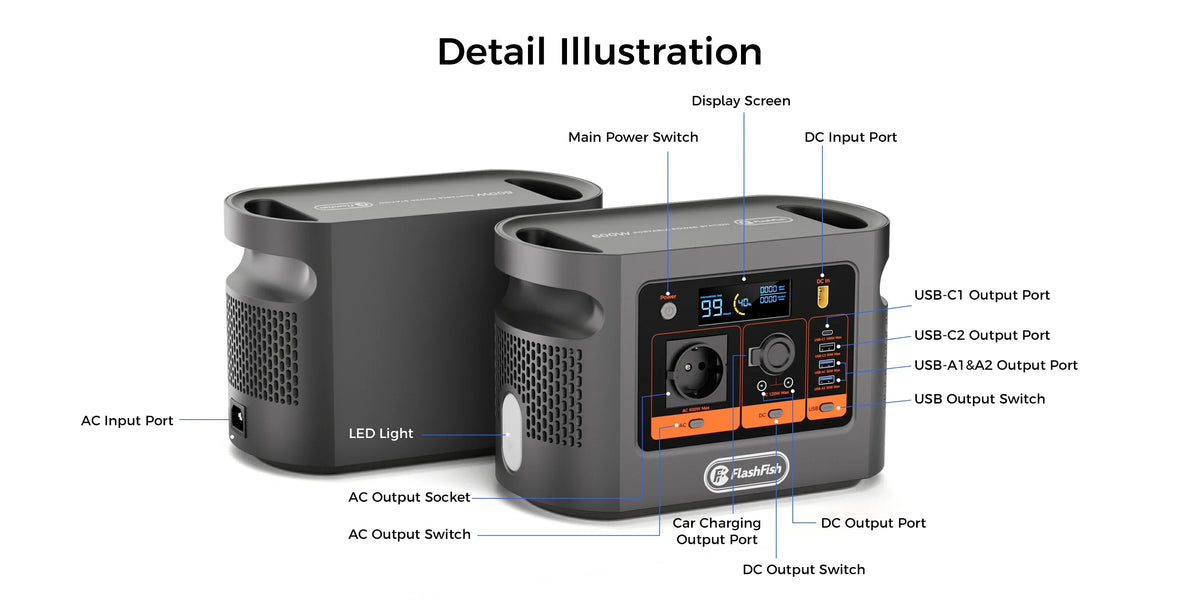
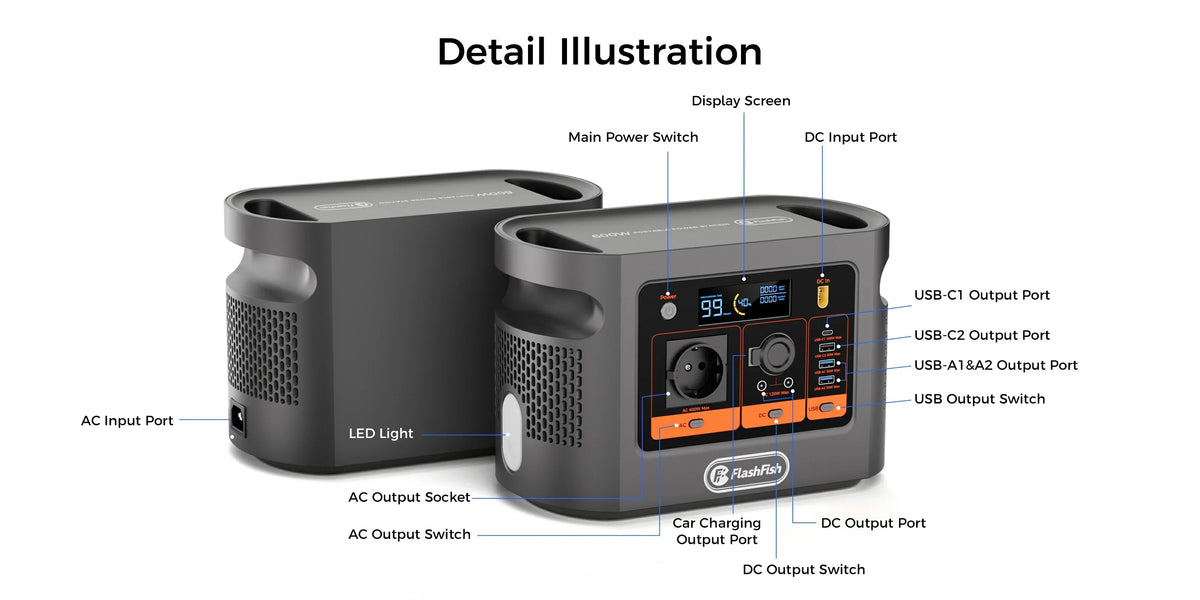
Short answer: plan a volunteer livestream as five separate paths: power, USB or video data, capture and encoding, local recording, and network uplink. E106B may supply a verified part of the power path, but a powered camera or laptop does not prove that the stream can be captured, encoded, uploaded or recovered after a failure.
Keep the first rehearsal non-critical and indoors. Use exact equipment labels and current manuals, route cables away from people, test the entire workflow for the intended event length, and retain a local-recording or cancellation fallback. Do not name a camera, capture device or runtime until that exact setup has been verified.
Map the five paths
| Path | Evidence to collect | Failure that power alone cannot solve |
|---|---|---|
| Power | Adapter labels, voltage, watts, connector and station output | A device can power off, overload or use the wrong port |
| Data | Exact USB or video standard, cable and host-port capability | A charge-only or slower cable can power a device without carrying the required signal |
| Capture and encoding | Capture interface, driver, software, resolution and frame-rate test | The source can be visible locally but fail in the encoder |
| Recording | Available storage, file format and a test recovery | A live upload can fail while a local recording remains the only usable copy |
| Uplink | Venue connection, measured upload, account access and fallback | Local power does not keep provider infrastructure or a platform online |
Check E106B's documented power outputs against the complete equipment list. The station's 384Wh nominal capacity and 600W continuous AC rating are starting facts, not a stream-duration or compatibility result.
Power and USB data are different checks
The USB Implementers Forum explains that USB Power Delivery negotiates power and can operate alongside data. That does not mean every USB-C cable or port supports the same power, data rate or video mode. Record which cable connects each device, label both ends and test the exact host port that will be used at the event.
If the laptop uses its normal AC adapter, count that adapter as the station load. If a USB-C power path is proposed, match the laptop's required PD profile, the station port and a capable cable. A successful charge indication does not confirm that a separate capture cable carries the intended signal.
Build the rehearsal in layers
- Camera to capture: confirm a stable picture and audio path before adding streaming software.
- Capture to host: restart the computer and confirm the same device and settings return without an improvised fix.
- Host to local recording: record a sample long enough to inspect synchronisation, storage and file recovery.
- Host to platform: test the correct account, privacy setting, stream key and intended resolution on the venue network.
- Power transition: with the session stopped, move only verified loads to E106B and repeat the complete path.
- Fallback: disconnect the uplink deliberately and confirm the team can keep a local recording, notify viewers and stop safely.
Plan the physical event space
The UK Health and Safety Executive's event electrical-safety guidance asks organisers to plan power requirements, environmental conditions, access and cable routing. For a small indoor volunteer setup, keep the station and connections dry and ventilated, protect cables from crushing and trip hazards, and prevent unauthorised access to the power area. Venue rules and competent local review still apply.
Treat the network as an independent dependency
UK government telecom resilience guidance notes that networks can still experience disruption. Powering a router, laptop or mobile hotspot cannot establish upstream availability. Before the event, measure the venue upload path under realistic conditions and decide what the team will do if it degrades or disappears.
Common planning mistakes
- One cable, one assumption: USB-C shape does not disclose every power, data or video capability.
- One successful start: a short preview does not validate a full event, restart or file recovery.
- Power equals service: a live router does not prove the provider or platform is reachable.
- Capacity equals runtime: 384Wh is nominal energy, not the complete system's measured wall-side consumption.
- No graceful stop: every volunteer should know when to save, switch to local recording, notify viewers or cancel.
Frequently asked questions
If the camera powers on, is the livestream path ready?
No. Power does not prove that USB data, capture, encoding, recording, authentication or network upload works. Each path needs its own check.
Does a USB-C cable always carry both power and video data?
No. Cable and port capabilities vary. Confirm the exact cable, device port, negotiated power profile and required data or video mode from the manufacturers.
Can 384Wh predict the stream duration?
Not by itself. Runtime depends on the complete measured load, conversion path, battery reserve and conditions. Use a full supervised rehearsal rather than a fixed estimate.
Will powering the router keep the uplink online?
Not necessarily. The local router is only one part of the service chain. Building equipment, provider infrastructure, mobile coverage and the streaming platform can fail independently.
What is the minimum fallback for a volunteer stream?
Keep a local recording when the equipment supports it, a second way to notify viewers, a written stop rule and the ability to cancel or reschedule without creating a critical dependency.
Conclusion
A useful livestream plan is an evidence map, not a wattage guess. Verify power, data, capture, recording and uplink separately, then rehearse them together with a clear stop rule. If the power path is still uncertain, Ask FlashFish Europe about the exact powered equipment; camera, software and network questions still belong with their respective manufacturers and service providers.
Sources and method
Checked 21 October 2026. FlashFish supplies E106B product evidence; USB-IF supplies protocol context; HSE supplies event electrical-planning guidance; and UK government guidance supplies the network-resilience boundary. This is a source-based checklist. No complete livestream, named camera, capture device, network, runtime or video-quality test was performed.




Yorum yazın
Bu site hCaptcha ile korunuyor. Ayrıca bu site için hCaptcha Gizlilik Politikası ve Hizmet Şartları geçerlidir.