
















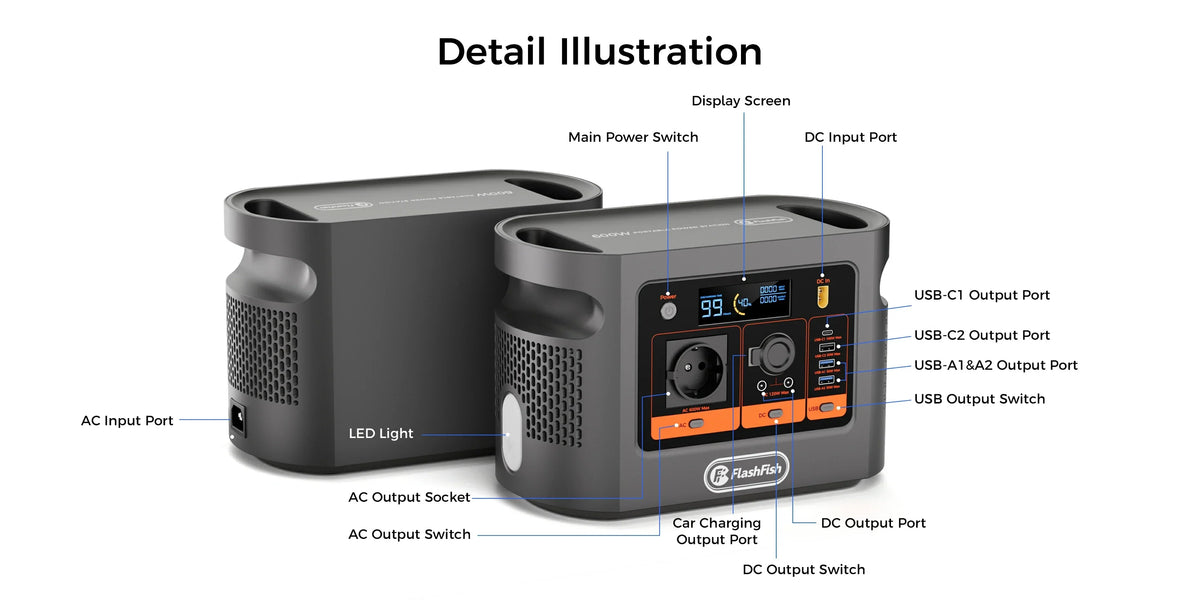
Short answer: not by connecting an Icom IC-7300 directly to the E106B 12V output. The radio documentation lists a 13.8V DC supply and up to 21A on transmit, while the E106B DC group is shared at 12V/10A/120W. That current mismatch is a stop condition. A separately approved 230V AC radio power supply may be a possible path, but its input, startup, cables, grounding, radio behaviour and the laptop load must all be checked.
Use SOURCE-VOLTAGE-CURRENT-RF-LAPTOP: start with the radio manufacturer's permitted source, compare voltage and maximum current, keep RF/grounding questions separate from basic power, and only then add the laptop to the complete load sheet.
The decisive check is the complete power path
| Path | Documented requirement | E106B evidence | Decision |
|---|---|---|---|
| Direct DC to IC-7300 | 13.8V DC ±15%; up to 21A transmit | 12V/10A/120W shared DC group | Do not use: maximum current is insufficient |
| IC-7300 through its approved AC supply | Exact supply must match the radio and EU mains | 230V/50Hz pure-sine AC; 600W shared maximum | Conditional: verify the supply input, startup and full load |
| Laptop by USB-C | Laptop and cable must accept the offered PD profile | USB-C1 up to 100W; USB-C2 up to 30W | Conditional: verify negotiation and simultaneous load |
| Laptop by AC charger | Charger input label and laptop demand | Uses the same shared AC budget as radio supply | Conditional: total both AC inputs and observe startup |
Check E106B against your complete radio setup only after writing down every item between the station and each load.
Why 12V is not enough information
The IC-7300's nominal 13.8V requirement includes a stated tolerance, so voltage alone is not the decisive rejection in this example. Current capacity is. Its documentation lists 21A maximum on transmit; the E106B DC group shares 10A across its DC outputs. A plug that can be made to fit does not raise that limit, and this guide provides no rewiring or adapter workaround.
The AC-supply route is a separate engineering question
An approved radio power supply converts 230V AC to the DC voltage and current the radio expects. Before using one, read its European input label and radio-manufacturer instructions, record input watts, inspect its mains and DC leads, and keep the combined AC demand inside E106B's shared 600W output. The headline arithmetic still cannot establish startup behaviour, protection response, receive noise or transmitter performance.
Add the laptop by protocol, not by connector shape
E106B documents USB-C1 up to 100W Power Delivery and USB-C2 up to 30W. Check the laptop's accepted voltage/current profiles and use a cable rated for the requested power. If the laptop instead uses its AC charger, add that charger's input to the same shared AC load as the radio supply. Do not count the laptop's battery capacity as free station energy.
RF and station safety remain separate gates
Pure-sine AC does not answer every electromagnetic-compatibility question. Antenna placement, feed line, bonding, earthing, cable routing, nearby electronics and the radio power supply can all affect observations. Establish a receive-noise baseline, add one device at a time, and stop if there is abnormal heat, odour, damage, repeated tripping or unstable equipment behaviour. Follow Icom and RSGB guidance for the actual station.
Three practical station examples
- IC-7300 connected to E106B's car-style 12V outlet: reject this path. The radio's documented 21A transmit maximum exceeds the station's shared 10A DC limit.
- IC-7300 using its approved EU AC power supply, plus a USB-C laptop: possible only after checking the supply input, laptop PD profile, cables and combined load. Start with receive-only observation, then follow the equipment manuals; no transmit result is assumed.
- A different low-power transceiver: restart the method from its own manual. Do not transfer the IC-7300 figures or assume that every radio labelled 12V fits the E106B DC group.
When E106B may fit
- The radio uses an approved EU AC supply whose documented input and startup fit inside the shared AC limit.
- The laptop accepts a documented USB-C profile or a verified AC charger.
- Every simultaneous load, cable and output group is recorded and stays inside its own limit.
- The operator has an appropriate station plan for earthing, antenna, RF exposure, ventilation and cable routing.
- The setup is supervised and non-critical while observations are recorded.
When it does not fit
- The plan connects an IC-7300 directly to the E106B 10A DC group.
- The radio, power supply, laptop, charger, connector or polarity cannot be identified.
- The combined load depends on an unpublished E106B peak value or untested startup margin.
- The station requires established RF-noise, emergency-communications or uninterrupted-operation performance.
- Cables, plugs or equipment show damage, heat, odour, unstable operation or repeated trips.
Frequently asked questions
Can I connect an IC-7300 directly to the E106B 12V output?
No. The IC-7300 documentation lists up to 21A on transmit, while the E106B DC group is shared at 12V/10A/120W. The current mismatch is decisive, and no improvised connector or wiring change is recommended.
Could I use the IC-7300's approved AC power supply from E106B?
Potentially only after checking the exact power supply's 230V/50Hz input, input watts, startup behaviour, cables and the complete simultaneous load. This draft does not establish compatibility or RF performance.
Can E106B charge a laptop while the radio is operating?
Only when the laptop accepts a documented E106B USB-C profile or its verified AC charger and the combined station load remains within every output-group limit. Check the exact laptop and cable.
Does pure-sine AC prove clean radio reception?
No. Waveform type does not establish conducted or radiated RF-noise behaviour in a particular antenna, cable, grounding and operating setup. Observe the receive noise floor and investigate changes methodically.
How long will E106B run a radio and laptop?
This article does not give a runtime figure. Transmit duty cycle, RF power, power-supply losses, laptop demand, screen use, temperature and battery state all change the result.
Conclusion
For the IC-7300 example, direct E106B DC is a clear non-fit because 10A is below the radio's documented 21A transmit maximum. An approved EU AC supply plus a correctly negotiated laptop path may be considered only after checking the entire setup. Ask FlashFish Europe about the exact radio power path and have the station-specific RF and safety plan reviewed before relying on it.
Sources and evidence limits
Checked 16 October 2026. E106B facts come from the authoritative local product record and current Europe page. Icom supplies the IC-7300 example requirements; RSGB supplies general station-safety and interference context. No radio, power supply, laptop, antenna or E106B unit was connected or measured, and no transmit, RF-noise, grounding, runtime or emergency-service result is claimed. The image is a ports reference only.



Yorum yazın
Bu site hCaptcha ile korunuyor. Ayrıca bu site için hCaptcha Gizlilik Politikası ve Hizmet Şartları geçerlidir.