
















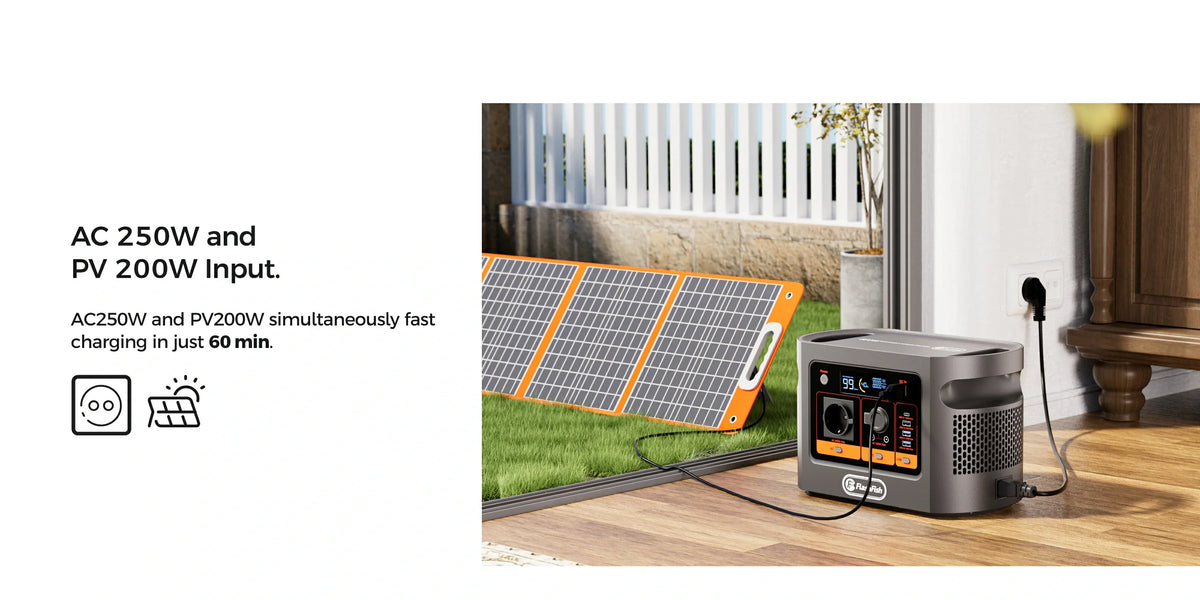
Short answer: plan the second E106B work session from what you actually observe after session one and during the recharge break. Do not assume that a break returns the station to full, and do not divide nominal battery capacity by a maximum input rating to invent a refill time.
What the E106B record can and cannot tell you
The exact E106B record lists a 384Wh nominal battery, 600W continuous pure-sine AC output, up to 250W AC charging input and up to 200W solar/DC input. The current E106B Europe page shows the same input paths. Those are equipment limits, not a measured usable-energy figure or a promise that charging remains at the maximum rate.
| Known before planning | Must be observed for this workflow |
|---|---|
| 384Wh nominal capacity | Session-one start and finish indications |
| 600W continuous AC rating | Complete load behaviour and any warning |
| 250W maximum AC input | Actual break length and interruptions |
| 200W maximum solar/DC input | State shown at the end of the break |
| Peak AC output is not provided | Reserve required to finish session two safely |
Copy this two-session worksheet
| Record | Session 1 | Recharge break | Session 2 decision |
|---|---|---|---|
| Planned task and stop time | Write the task and latest safe stop | Write the real available window | Write the full task still required |
| Complete connected load | List every adapter and accessory | Disconnect or leave only what the manual permits | Recheck the list; do not copy it blindly |
| Station indication | Record before and after | Record at start and finish | Use the new observed state |
| Energy observation | Record wall-side load data if measured | Record wall-side charging data only if the meter setup is permitted | Do not call wall energy usable battery energy |
| Stop event | Warning, trip, heat, damage or instability | Interruption, abnormal heat or damaged lead | Any unresolved event means no-go |
| Fallback | Approved mains, saved work or reschedule | Keep the fallback available | Choose it when the evidence is insufficient |
Before session one
- Read the current regional E106B manual and check the delivered unit's label.
- List the exact work devices, adapters, chargers, cables and accessories. Use their labels, not category averages.
- Confirm that the complete load remains within every relevant output and cable rating. The missing E106B peak figure means a starting load cannot be approved from a guessed surge number.
- Choose a dry, ventilated location with a clear cable route. The HSE equipment guidance recommends checking that work equipment suits both the task and the electrical supply.
- Define the session-two reserve and the fallback before starting. A vague wish to “have enough left” is not a decision rule.
Measure the work session and the break separately
A compatible plug-in energy meter can help characterise the complete load on mains before the rehearsal. The Brennenstuhl PM 231 E page says the meter can display electrical values and total connected-device energy use. Follow its exact instructions and rating. A wall-side reading is not the same as energy delivered from or stored in the battery.
During the break, record elapsed time, the charging source, the station indication at the start and finish, interruptions and anything abnormal. Keep the break as a separate recovery period for this plan; do not make the workflow depend on unverified charge-through continuity.
Make a fresh go/no-go decision for session two
| Finding at the end of the break | Decision |
|---|---|
| The complete second-session load is known, the observed state meets the pre-set reserve rule and the first rehearsal had no unresolved event | Proceed only for the bounded non-critical session and keep the fallback ready |
| The break was shorter than planned or charging was interrupted | Reduce the task only if the new task has been separately checked; otherwise use the fallback |
| A warning, trip, damaged cable, unusual heat, unstable device or unexplained reading occurred | Stop and resolve it before reuse |
| The required state or reserve cannot be verified | No-go: use approved mains or reschedule |
Review the current E106B inputs and outputs before building the worksheet.
Common planning mistakes
- Treating 250W as a constant charging rate.
- Calling 384Wh the energy that will reach the work devices.
- Measuring only one adapter while forgetting the display, hub, light or network equipment.
- Starting session two from the original plan instead of the new observed state.
- Using a meter or extension device without checking its manual, rating and condition.
- Letting a non-critical task become dependent on an untested battery workflow.
Frequently asked questions
Does a recharge break return E106B to full?
Do not assume that it does. Record the station indication at the start and end of the break, the actual elapsed time and any interruption, then make a new go/no-go decision.
Can I calculate the break from 384Wh divided by 250W?
No. 384Wh is nominal battery capacity and 250W is a maximum AC input, not a constant observed charging rate. That division omits charging behaviour, losses, temperature and starting state.
What should I measure during session one?
Record the complete load, duration, start and finish indications, warnings and work completed. A compatible meter can help characterise wall-side load but cannot reveal exact battery energy delivered.
Can I keep working while E106B recharges?
This worksheet does not depend on that arrangement. Treat the break as a separate recovery period unless the current regional manual and exact setup have been verified for another method.
When should I cancel the second session?
Stop when the observed state, available break, equipment condition or reserve requirement does not support the full planned session with margin. Use approved mains or reschedule instead of improvising.
Sources and next step
This planning method uses the current E106B Europe page, the authoritative exact-model record, the Brennenstuhl meter description and HSE equipment guidance. It does not report a physical E106B charging or work-session test. For a regional input, charging-cable or manual question, Ask FlashFish Europe about your exact charging setup with the exact unit and label details.



Yorum yazın
Bu site hCaptcha ile korunuyor. Ayrıca bu site için hCaptcha Gizlilik Politikası ve Hizmet Şartları geçerlidir.