















Short answer: a P66A can be considered for a small, supervised phone-charging rota only after each phone, cable and port path is checked separately. Use timed turns, label devices at hand-in and return each phone directly to its owner. Do not promise fast charging, a fixed number of phones or a full charge per turn.
Start with the documented P66A ports
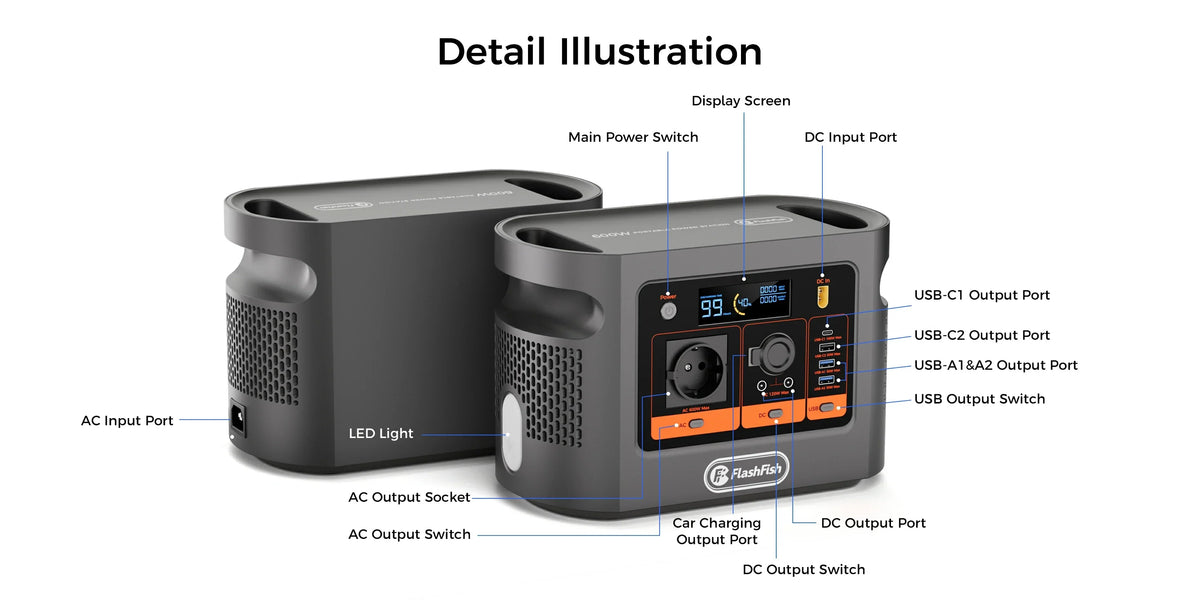
The current P66A Europe page presents about 144.3Wh nominal capacity and 200W rated AC output. The exact-model record lists two 5V/2.4A USB-A ports, one USB-A QC output up to 18W and one USB-C QC output up to 18W. It does not provide a simultaneous USB aggregate limit.
Do not read USB-C as a charging promise
The USB-IF Power Delivery overview describes a negotiated USB-C power protocol. P66A's USB-C entry is labelled QC, not USB Power Delivery. A connector shape therefore does not prove that a particular phone will accept its preferred profile or charge at the headline port maximum.
Build the rota around one verified path
| Record | Check before accepting the phone | Handback rule |
|---|---|---|
| Owner and device label | Owner can identify the phone without sharing an unlock code | Return directly to the same person |
| Cable | Correct connector, no exposed conductor, damage or unusual heat | Return the same cable with the phone |
| P66A port | Write the exact port used; do not call QC USB-C a PD port | Disconnect before the next device is connected |
| Turn | Agree a time or small target, not a promised full charge | Record start and end percentage if the owner agrees |
Check the current P66A port details before printing the rota, because the public page and regional manual—not a generic USB assumption—define the available connections.
Set up the supervised table
- Name one supervisor for each open charging table.
- Keep the station and connectors away from liquids and unplanned public handling.
- Route cables so people do not walk through them or pull devices from the table.
- Inspect the station, plug, charger and cable before each session.
- Start with one verified phone-and-cable path. Do not add individual port maxima and call the result a shared rating.
- Stop accepting devices before the supervisor leaves, then complete every handback.
Use safety guidance within its scope
Electrical Safety First's USB charger guidance recommends following manufacturer instructions and checking for damage or unusual heat. The HSE event guidance also stresses planning power needs, restricting public access and routing cables to reduce trip or mechanical damage. These are general UK sources; the organiser must still follow the venue's local rules and the exact equipment manuals.
Define the queue without inventing throughput
Use a clock, not a devices-per-hour promise. A phone that begins at 10%, a phone used during charging and a phone that rejects a cable can produce very different results. Record what happened, then decide whether the next session needs longer turns, fewer simultaneous devices or a different documented port mix.
Stop conditions and common mistakes
- Stop for damaged connectors, exposed conductors, liquid, warnings, instability or unusual heat.
- Do not collect passcodes or promise data security; owners should keep devices locked and collect them directly.
- Do not use an unverified multi-port adapter to multiply places.
- Do not describe four visible USB sockets as four assured simultaneous fast-charge paths.
- Do not estimate completed charges from nominal Wh alone.
Frequently asked questions
Does the P66A USB-C port support USB Power Delivery?
The exact-model record labels it QC up to 18W, not USB Power Delivery.
How many phones can be charged at once?
The reviewed sources do not establish a simultaneous USB aggregate limit or universal device count.
Can organisers promise a full charge in each turn?
No. Use a timed turn or modest target and record the actual result.
Can the table be left unattended?
No; this workflow depends on a named supervisor and direct device handback.
What should cause an immediate stop?
Damage, liquid, warnings, instability or unusual heat should stop the affected path.
Choose the next step
Use the rota only for the exact devices and cables that pass the session check. If the required port mix or documented limits do not fit the queue, Browse FlashFish Europe portable power stations and compare the current specifications before changing the plan.



Commenta
Questo sito è protetto da hCaptcha e applica le Norme sulla privacy e i Termini di servizio di hCaptcha.