















Short answer: compare two portable power station runtime reports only when they disclose a sufficiently similar output path, load pattern, starting charge, stop point, environment and measurement method. If one of those fields is missing, label the difference unknown. Elapsed hours alone are not a fair comparison.
Why two runtime numbers can describe different tests
A result such as “five hours” hides the energy path and the endpoint. One report may power a laptop through the station's AC inverter and original charger from 100% until shutdown. Another may use direct USB-C from 80% to 20%. Even when the laptop name matches, workload, charging state and background activity can change average demand.
The first question is therefore not “which number is longer?” It is “were the experiments similar enough to compare?”
Runtime-report comparability worksheet
| Field | Report A | Report B | Comparable only when |
|---|---|---|---|
| Exact station and regional/version details | Known / unknown | Known / unknown | The records describe the products actually tested |
| Output path and mode | AC, USB-C, DC; settings | AC, USB-C, DC; settings | The paths match, or delivered energy is measured and the difference is explained |
| Load behaviour | Exact device, workload, cycling, average and peak | Exact device, workload, cycling, average and peak | The workload is controlled closely enough to repeat |
| Starting state | Charge percentage and rest/temperature state | Charge percentage and rest/temperature state | The usable starting points are aligned |
| Stop criterion | Station shutdown, selected reserve, device stops, or timed stop | Same fields | The endpoint means the same thing |
| Environment | Temperature, ventilation and relevant conditions | Same fields | Material environmental differences are controlled or disclosed |
| Measurement | Meter model, connection point, interval and limitations | Same fields | The readings capture the quantities being compared |
| Repetition and variation | Run count and range | Run count and range | A single unusual run is not treated as a stable result |
Use the FlashFish runtime calculator with your own inputs as a transparent reasonableness check after completing the worksheet. It does not validate a report whose method is missing.
A hypothetical 65W-laptop example
Imagine three reports about a laptop sold with a 65W charger. These are method examples, not measured results:
| Hypothetical report | What it discloses | Decision |
|---|---|---|
| A | AC path, laptop workload script, 45W measured average, station starts at 100%, ends at automatic shutdown, 20°C room, meter model and total Wh recorded | Potentially repeatable, but still needs station version, run count and measurement uncertainty |
| B | USB-C path, starts at 80%, stops at 20%, no average demand and no meter disclosure | Not directly comparable with A; both the conversion path and usable charge window differ |
| C | AC path, cycling load of 30–60W, starts at 100%, operator stops at 10%, meter records total Wh | Could be normalised only if the workload, endpoint and delivered-energy method are fully explained |
The 65W charger label is a maximum capability, not proof that the laptop averaged 65W. Charging its internal battery, display brightness, processor load and sleep behaviour can all change the test load.
Use a meter for the quantities it actually measures
The Brennenstuhl PM 231 E product page lists voltage, frequency, current, power factor, power output, total energy use, cost and time among its functions. That can support an AC test record when the meter is connected at a clearly stated point.
It does not make every test complete. A plug-in AC meter does not directly measure a USB-C path, and the reviewed page does not establish it as an inrush instrument. A credible report names the meter, connection point, sampling or display method and quantities that remain unmeasured.
Record operating modes instead of assuming they are neutral
An operating mode can change what a station does when a load is low or intermittent. For example, the Victron Inverter VE.Direct manual documents an ECO mode for that named inverter family: it can switch off under no-load conditions and briefly check periodically.
This is not a FlashFish behaviour claim. It is evidence that a runtime report should state model-specific settings and mode behaviour rather than writing only “AC on”. Consult the exact tested product's documentation.
Use estimates as checks, not replacements for results
The FlashFish Europe runtime calculator exposes a planning relationship:
estimated hours = capacity in Wh × assumed efficiency × (1 − reserve fraction) ÷ average load in W
Capacity comes from the exact model record; efficiency, reserve and average load must be stated inputs. Cycling, inverter losses, battery age, temperature and output path can move the result. If a published runtime is far from the estimate, investigate the method instead of forcing the report to match the formula.
Restrained FlashFish example: E106B
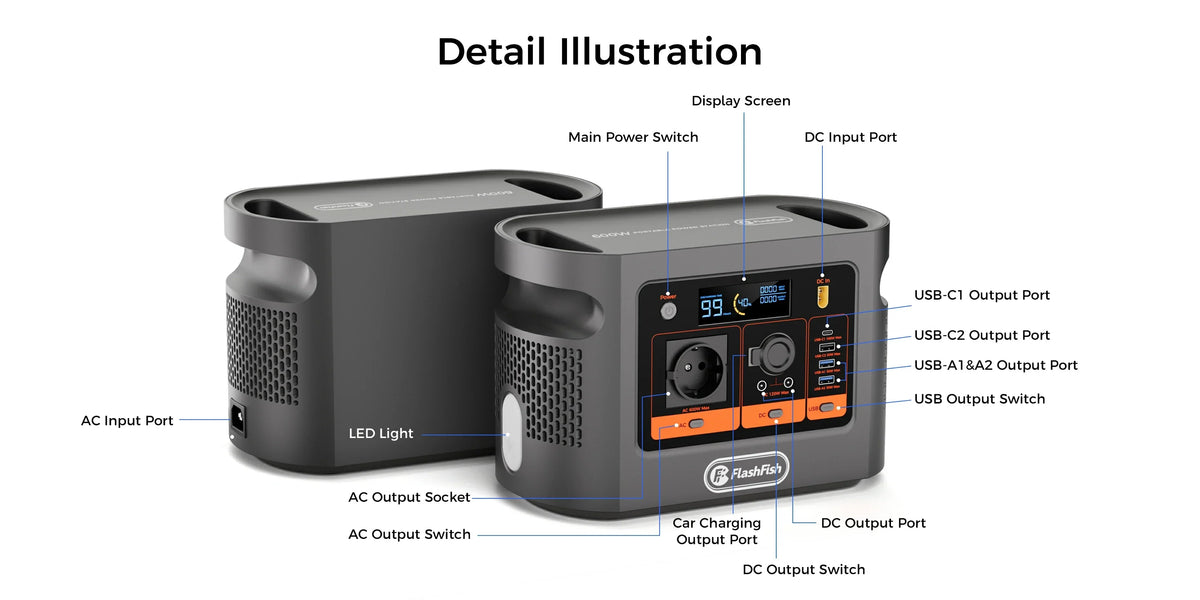
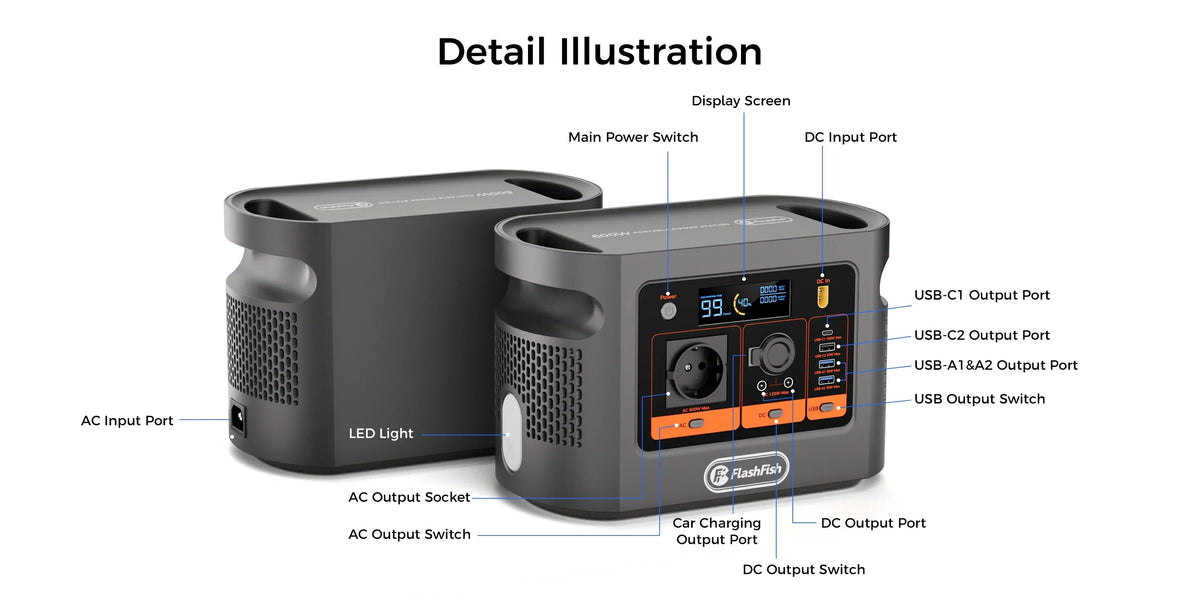
The current E106B Europe record documents a 384Wh LiFePO4 battery and 600W continuous pure-sine AC output. It also lists USB-C1 up to 100W, USB-C2 and two USB-A ports up to 30W per port, with USB-C2 plus USB-A1 sharing 5V/3A when used together.
Those fields identify possible test paths; they are not runtime results. A report using E106B should still state whether it used AC, USB-C1 or another output, the actual average load, the battery window and the endpoint. The authoritative record does not provide a measured efficiency, usable delivered energy, peak output or ECO-mode behaviour for this comparison.
Common comparison mistakes
- Comparing elapsed time while ignoring different starting or ending charge states.
- Comparing AC and direct DC or USB-C paths as though their conversion losses were identical.
- Using an appliance label or charger maximum as measured average demand.
- Accepting one run with no range as representative performance.
- Transferring a setting or mode from one inverter model to another.
- Treating a calculator estimate as independent validation.
- Ranking a reviewer when the original method and raw observations are unavailable.
Frequently asked questions
Can I compare two results that both used a 65W laptop?
Not automatically. Match the workload, average demand, output path, station start and stop points, environment and measurement method.
Can AC and USB-C runtime tests be compared directly?
Usually not without a disclosed normalisation method. The conversion paths differ.
Is a plug-in energy meter enough for every test?
No. State what it measured, where it was connected and what it could not capture, especially for USB-C or short transients.
What if the start or endpoint is missing?
Mark the usable charge window unknown and do not compare the elapsed time as though both reports used the same window.
Does a runtime calculator verify a report?
No. It is a reasonableness check driven by assumptions, not a substitute for the actual method and readings.
Can one inverter's ECO behaviour be applied to another station?
No. Use model-specific documentation. The Victron example only shows why operating-mode disclosure matters.
Sources and evidence limits
- Brennenstuhl PM 231 E product page — documented meter functions.
- Victron Inverter VE.Direct operation manual — one inverter family's ECO-mode example.
- FlashFish Europe runtime calculator — transparent planning formula and limitations.
- FlashFish Europe E106B page and exact-model record — bounded model and output facts.
Evidence checked 26 October 2026. All report examples are hypothetical. No runtime test, meter validation, reviewer ranking or named qualified review was performed.



Leave a comment
This site is protected by hCaptcha and the hCaptcha Privacy Policy and Terms of Service apply.