
















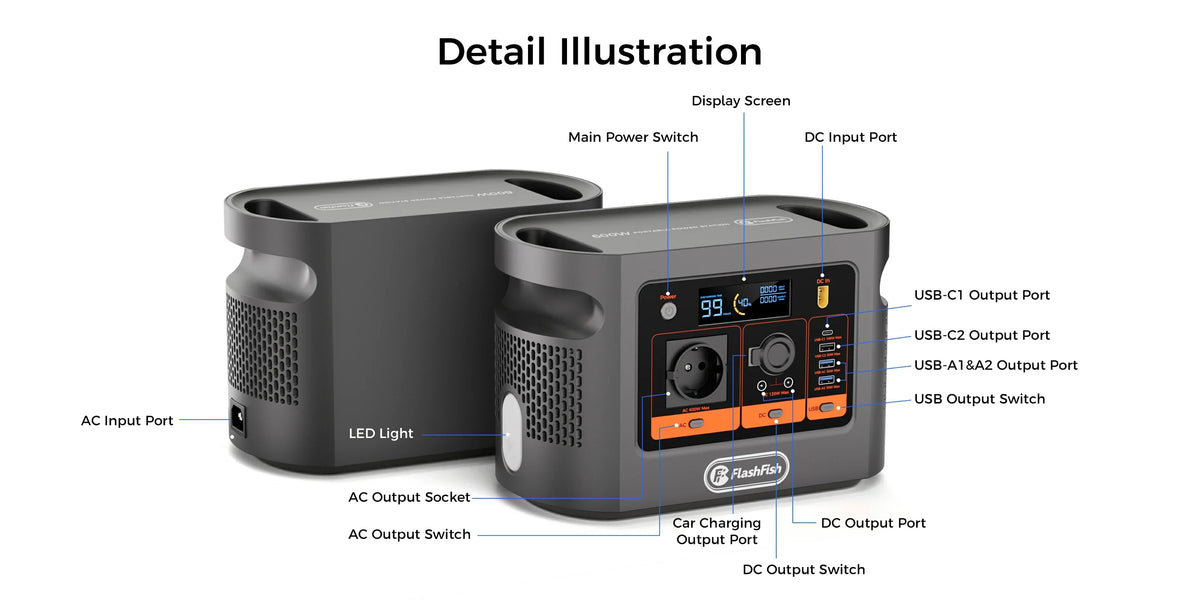
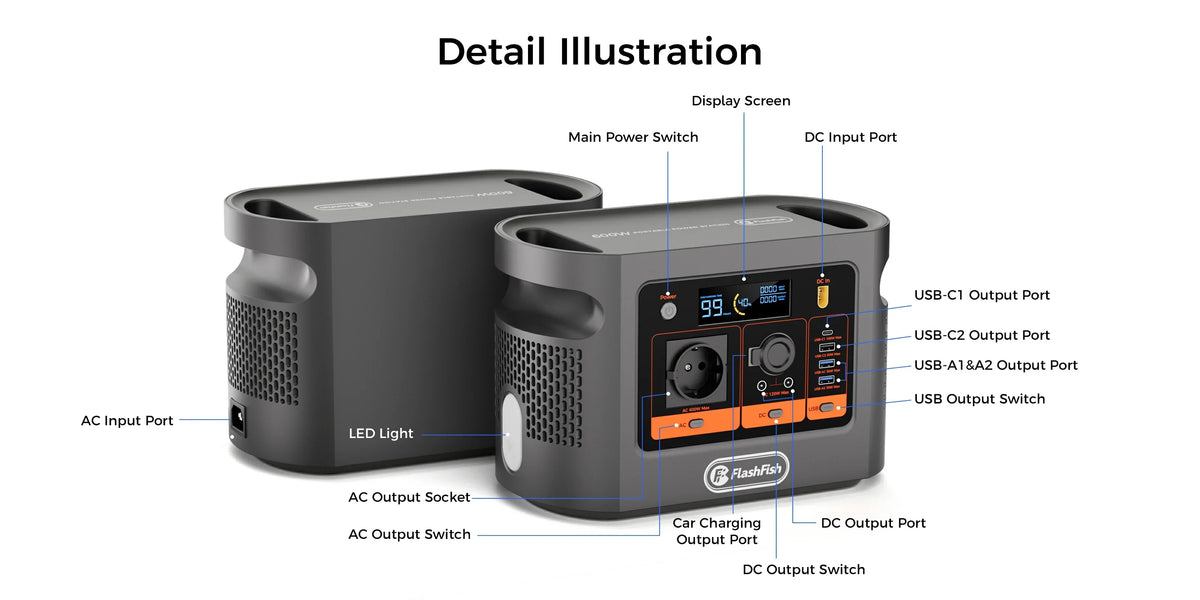
Direct answer: the available E106B record does not document USB-C as a charging input. It lists USB-C1 and USB-C2 under outputs, while AC input and solar/DC input are the documented ways to recharge the station. Do not assume a USB-C laptop charger can recharge E106B unless the current manual or FlashFish support confirms that function for your exact hardware version.
What the exact E106B record says
| Port or path | Direction in the available record | Recorded limit |
|---|---|---|
| AC input | Input | 100–240V, 50/60Hz, 250W maximum |
| Solar/DC input | Input | 12–30V, 10A, 200W maximum |
| USB-C1 | Output | 100W maximum |
| USB-C2 | Output | 30W maximum |
The current E106B Europe page also labels USB-C1 and USB-C2 as outputs. A 100W USB-C1 output rating does not become a 100W input rating when a laptop charger is connected.
Why USB-C shape does not prove charging direction
The USB Implementers Forum's USB Power Delivery overview explains that USB PD can support negotiated power and flexible direction. That is a capability of the standard when products implement the required roles. It does not mean every USB-C port is bidirectional, and it does not override the direction documented by the product manufacturer.
| Evidence | What it proves | What it does not prove |
|---|---|---|
| USB-C connector is present | The physical connector type | Input, output or bidirectional role |
| USB PD is supported | Negotiated USB power for the documented role | That every optional role is implemented |
| USB-C1 says 100W output | Its recorded source-side ceiling | A 100W station charging input |
| A laptop charger fits the cable | Mechanical connection only | Safe electrical negotiation or supported charging |
Use this port-direction check
- Match the exact model and regional version on the station label.
- Open the current E106B manual from the FlashFish Europe Support Center.
- Find the input section, not only the USB output table.
- Match the proposed charger's voltage profiles, cable rating, connector and power role to an explicitly supported station input.
- If USB-C input is still absent or ambiguous, do not test it by reversing a cable or adding an adapter chain. Ask the manufacturer for written confirmation.
Ask FlashFish Europe to confirm your exact E106B version. Include a photo of the model and regional label plus the laptop charger's output label.
Use the documented charging paths
For the available E106B record, the documented paths are the AC input and the 12–30V solar/DC input within their stated limits. That does not approve an arbitrary charger or adapter. Use the supplied or explicitly supported charging equipment and follow the current regional manual.
What not to try
- Do not treat USB-C1's 100W output figure as an input specification.
- Do not use a reverse cable, trigger board or improvised adapter to discover whether power will flow.
- Do not assume a successful connector fit means correct voltage, current, polarity or power role.
- Do not copy a bidirectional feature from another FlashFish model or a laptop.
- Do not turn “not documented” into a universal claim about every hardware revision.
Frequently asked questions
Can I recharge E106B through USB-C?
USB-C charging input is not established by the available E106B record. The documented inputs are AC and solar/DC, while USB-C1 and USB-C2 are listed as outputs.
Does a USB-C socket always work in both directions?
No. USB Power Delivery can support flexible power roles, but the device must implement and document the relevant role. The connector shape alone is not evidence.
Will a 100W USB-C laptop charger work because USB-C1 is 100W?
That conclusion does not follow. The 100W figure describes USB-C1 output capability in the E106B record; it is not an input rating.
Can I use an adapter cable to feed the DC input from a laptop charger?
Do not improvise an adapter chain. A safe input needs the exact supported voltage, current, connector, polarity, cable and manufacturer instructions for every component.
What evidence would change the answer?
A current regional E106B manual or written manufacturer confirmation for the exact hardware version could document a supported USB-C input. Until then, use only documented charging inputs.
Sources and next step
This answer uses the exact E106B record, the current Europe product and support pages, and USB-IF protocol context. No laptop charger, cable or reverse-power behaviour was tested. Review the documented E106B charging inputs, then verify the delivered unit and current manual before use.



Hinterlasse einen Kommentar
Diese Website ist durch hCaptcha geschützt und es gelten die allgemeinen Geschäftsbedingungen und Datenschutzbestimmungen von hCaptcha.